
gallucciNET Film and Cinema Looks: 16 LUTs for Food, Drink and Lifestyle Content
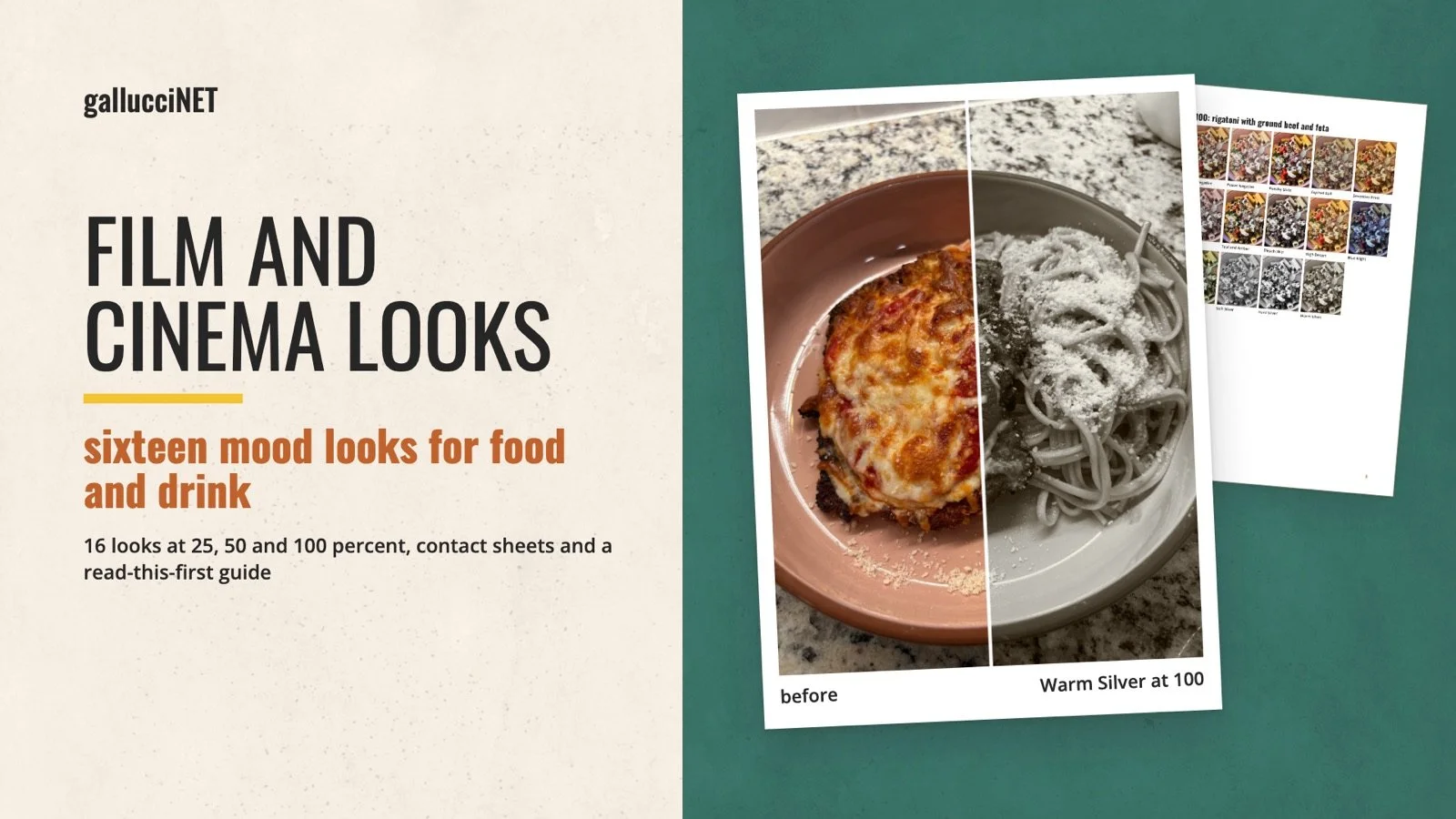
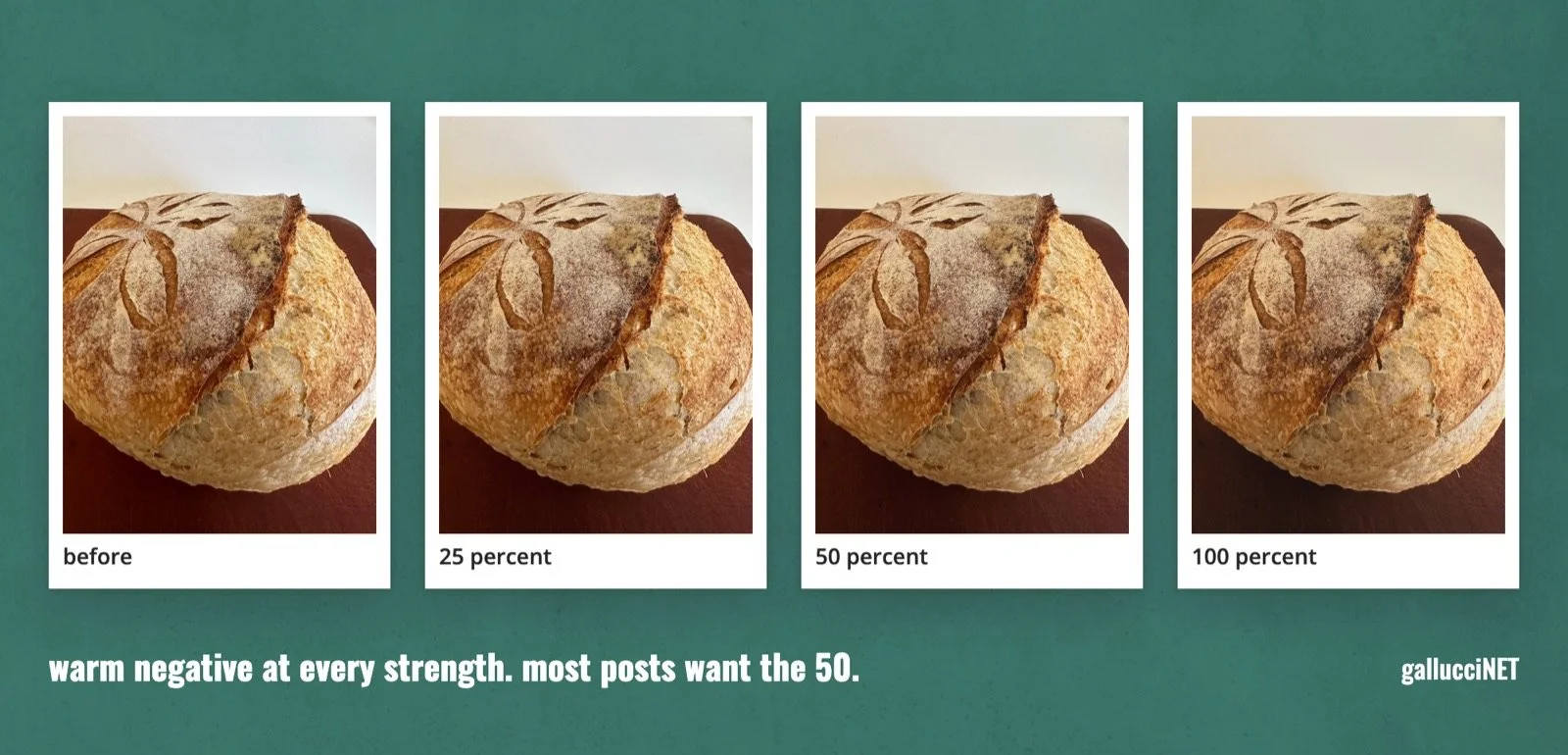
Faded film, a hard slide, a teal and amber movie grade, a desert, a night and three black and whites, each at 25, 50 and 100 percent.
last updated · what has changed
the problem
Film looks are the most bought and least used LUTs there are. A pack of eighty stock names shows up, three of them turn a plate of food gray or green, and the rest sit in a folder because nobody told you which light they were built for.
Food and drink make it worse. A movie grade built for skin and city lights turns a red sauce brown, a black and white crushes the char on a steak to nothing, and a faded film look on every post makes a feed look like one long filter.
So this pack is sixteen looks with a note on each: what it does, the light it likes, and what it does badly. Each ships at three strengths, because a mood look at full strength is usually too much.
what's inside
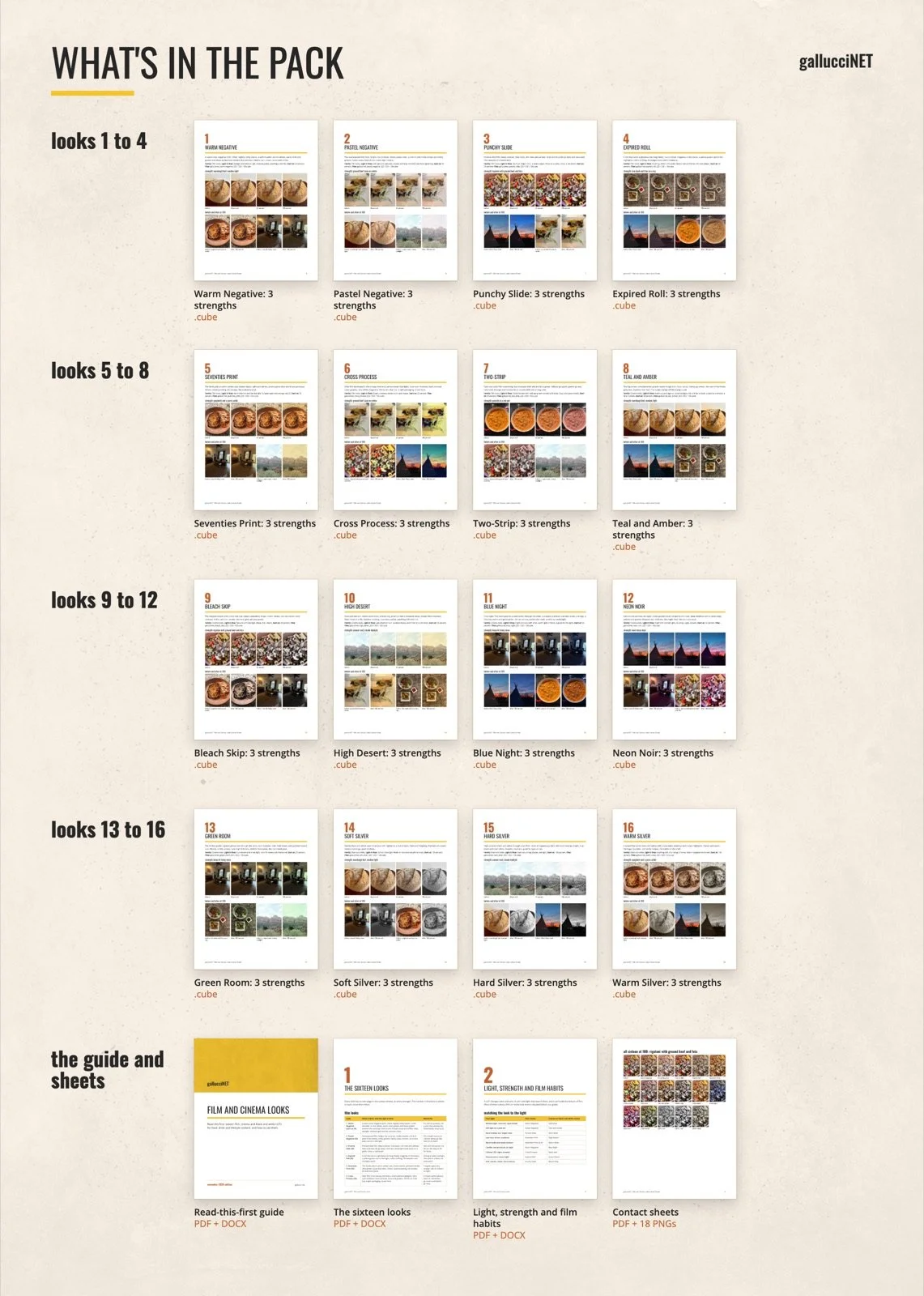
48 .cube files: sixteen looks at 25, 50 and 100 percent: seven film, six cinema, three black and white. 33-point, sRGB and Rec.709 in and out, one folder per look (.cube)
The read-this-first guide: what each look does, the light it likes and what to watch for, a light-to-look table, strength rules, the film habits a LUT can't do for you (grain, softness, halation, aspect), two stacks with the Social Color Pack, and install steps for Photoshop, Lightroom, Premiere Pro, DaVinci Resolve, Final Cut Pro, CapCut and phone apps (PDF + Word)
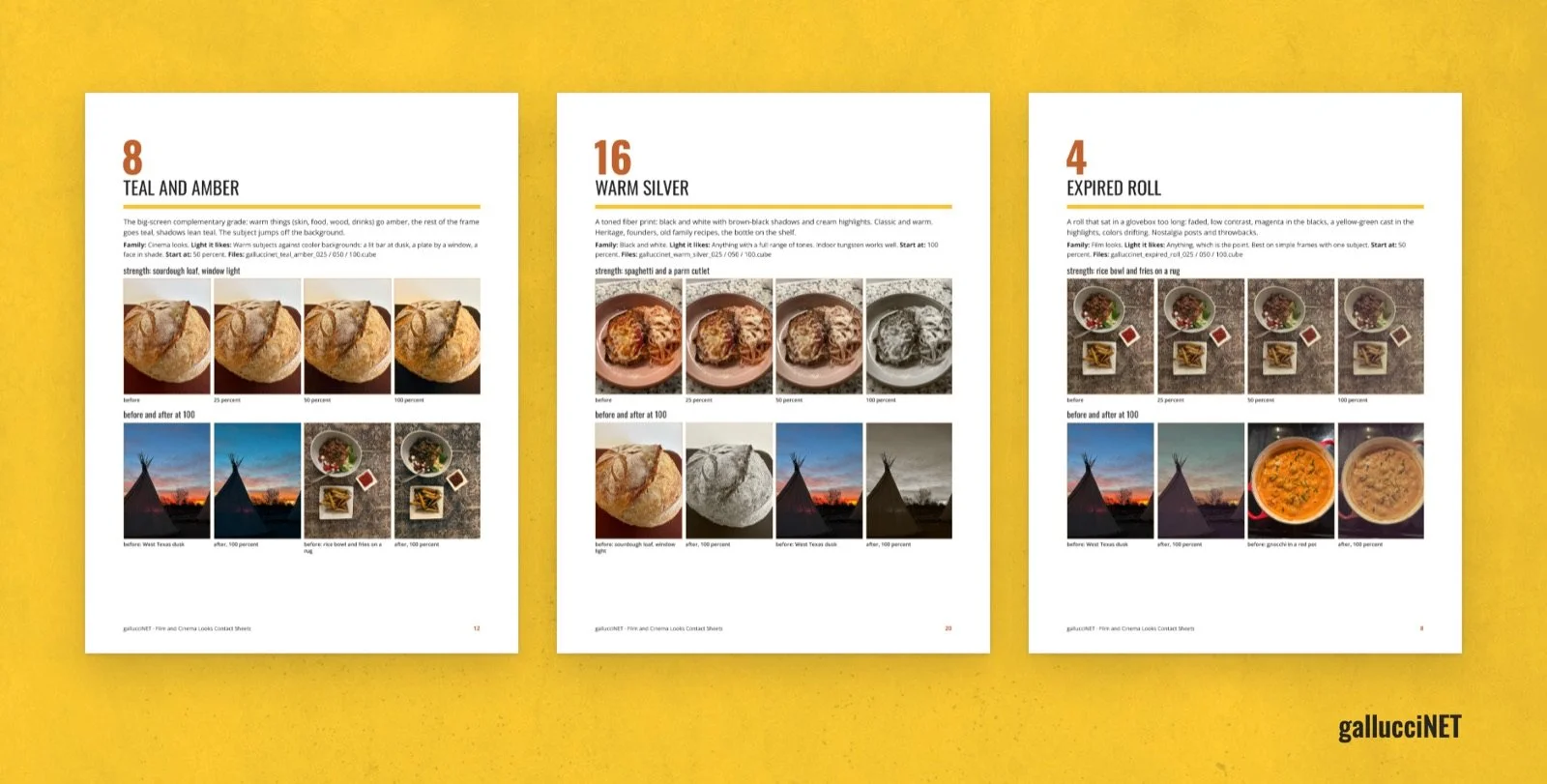
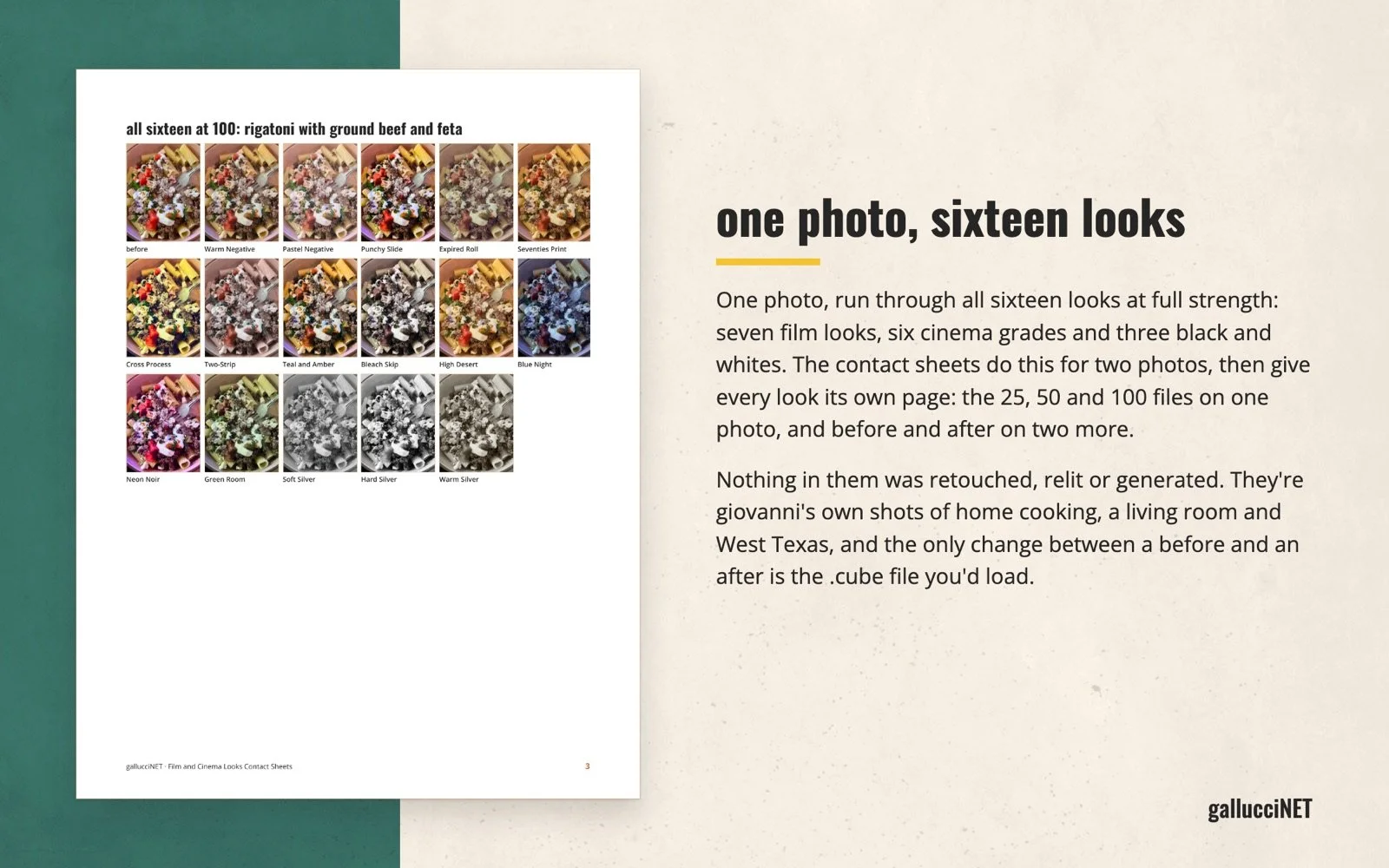
The contact sheets: two overview pages with one photo through all sixteen looks, then a page per look with the strength strip and two more before and afters (PDF, plus a PNG per page)
The terms of use: the first file in the download (PDF)
who it's for
Anyone who wants a film or movie feel on food and drink content:
creators and social media managers who shoot on a phone and want a mood look for reels and throwback posts
brand teams who already use the Social Color Pack for everyday posts and want a second shelf for the posts that need a mood
photographers and editors grading menu, bar, process and founder stories
It won't convert log footage, and it can't add grain. If you shoot S-Log, V-Log, C-Log, LogC, Apple Log or D-Log, convert to Rec.709 first; the guide says how, and where to add grain after.
preview
how it works
Pick from the contact sheets. The overview pages show one photo through all sixteen looks. The light-to-look table in the guide narrows it to two.
Fix the photo, then load the 50 file. Exposure and white balance first, the LUT second, grain last. The black and whites start at 100; Cross Process and Green Room start at 25.
Save the loud ones for the posts that need them. Keep one everyday look across the feed and use the mood looks for throwbacks, night posts and stories. The install section covers each editor, and Lightroom gets them as a profile.
where the method comes from
All sixteen looks were written from scratch for this pack as color math: a tone curve, hue and saturation moves by color band, a split tone and a print fade, each tuned by eye on real food and place photos. No vendor LUT was copied, converted, sampled or shipped, and no look is named after a film stock, a camera, a movie or a show.
It's built as the companion to the gallucciNET Social Color Pack and kept apart from it on purpose: every look was measured against the twelve in that pack so none of them duplicates one. Same .cube format, same 33-point size, same three strengths, same naming.
Every file was parsed back after export and applied to the test photos: each one changes the image, the 25, 50 and 100 files step up in order, and the gray ramp stays smooth.
formats and delivery
48 .cube files (3D LUT, 33-point), one folder per look
The guide as PDF and Word (.docx); the contact sheets as a PDF and 18 PNGs
Works in Photoshop, Lightroom (as a profile), Premiere Pro, DaVinci Resolve, Final Cut Pro, CapCut desktop, Affinity Photo, ffmpeg and any app that imports a .cube
One zip, delivered by download link as soon as payment clears
get the kit
$12, one time. One license for you or your organization.
All sales are final. Questions first? Email support@gallucci.net before you buy.
questions
Do I need the Social Color Pack?
No. This pack works on its own. The two are built in the same format and sit in the same folder; the Social Color Pack is the everyday shelf (daylight, lamp light, product on white, a bar at night) and this is the mood shelf. The guide gives two stacks that use both.
Are these copies of real film stocks?
No. They're original looks written as color math and named for what they do. They give you the feel of a warm negative print, a slide, an expired roll or a movie grade without imitating any one product.
Which strength should I use?
Start the color looks at 50 (Cross Process and Green Room at 25) and the black and whites at 100. In Photoshop, Premiere and Resolve you can also dial any strength in between from one file.
Does it add grain?
No. A LUT changes color and tone only. The guide shows where to add grain in each editor, after the grade.
Can I use it for clients?
Yes. Grade photos and video for your own business and for any number of client accounts, including paid ads, and hand over the graded work. The .cube files stay with you: a client that wants to grade with them itself needs its own copy. You can't resell or share the files, or turn them into presets or filters for anyone else (terms of use, sections 2.5 and 4.2).
Does it guarantee results?
No. How a look lands depends on your camera, light, exposure, white balance and software, which is why every look comes at three strengths and the contact sheets show it on real photos first. Test it on your own footage before a client sees it.
Can I get a refund?
No. All sales are final, because a digital file can't be returned once it's delivered. If a file arrives corrupted or won't open, email support@gallucci.net within 30 days and I'll send a working copy. If you're not sure this fits your brand, email support@gallucci.net before you buy and ask.
Do I get updates?
No. You get the edition you buy, and nothing on this page promises updates. If a new edition comes out, it's sold as its own product.
what has changed
every change to this product, newest first. the download you buy today is the current version.
November 27, 2026: First released.
terms
Buying or using this product means you accept the gallucciNET terms of use: gallucci.net/terms. A copy (READ_ME_FIRST_terms_of_use.pdf) is the first file in the download.
about giovanni
giovanni gallucci runs gallucciNET out of Marfa and Dallas. He's spent twenty years on social, content and launches for food and beverage brands, and graded most of what he shot along the way.
He hosts The Daily Trend Report, a morning podcast on food and beverage, content, social and AI (show notes at gallucci.net/podcasts), and wrote A Social Media Marketing Framework for Food and Beverage CPG Brands (2nd Edition) and Viral and Broke: A Field Guide to Social Media for Food and Beverage Brands. More at gallucci.net.
adage, emmy, telly & webby award-winning digital marketing consultant for purpose-driven food & beverage brands.